
Home › Forums › Photo Critique › Morning Glory
- This topic has 9 replies, 6 voices, and was last updated 8 years, 4 months ago by
 James Staddon.
-
AuthorPosts
-
May 11, 2018 at 12:28 pm #30775
 Paul JohnsonParticipant
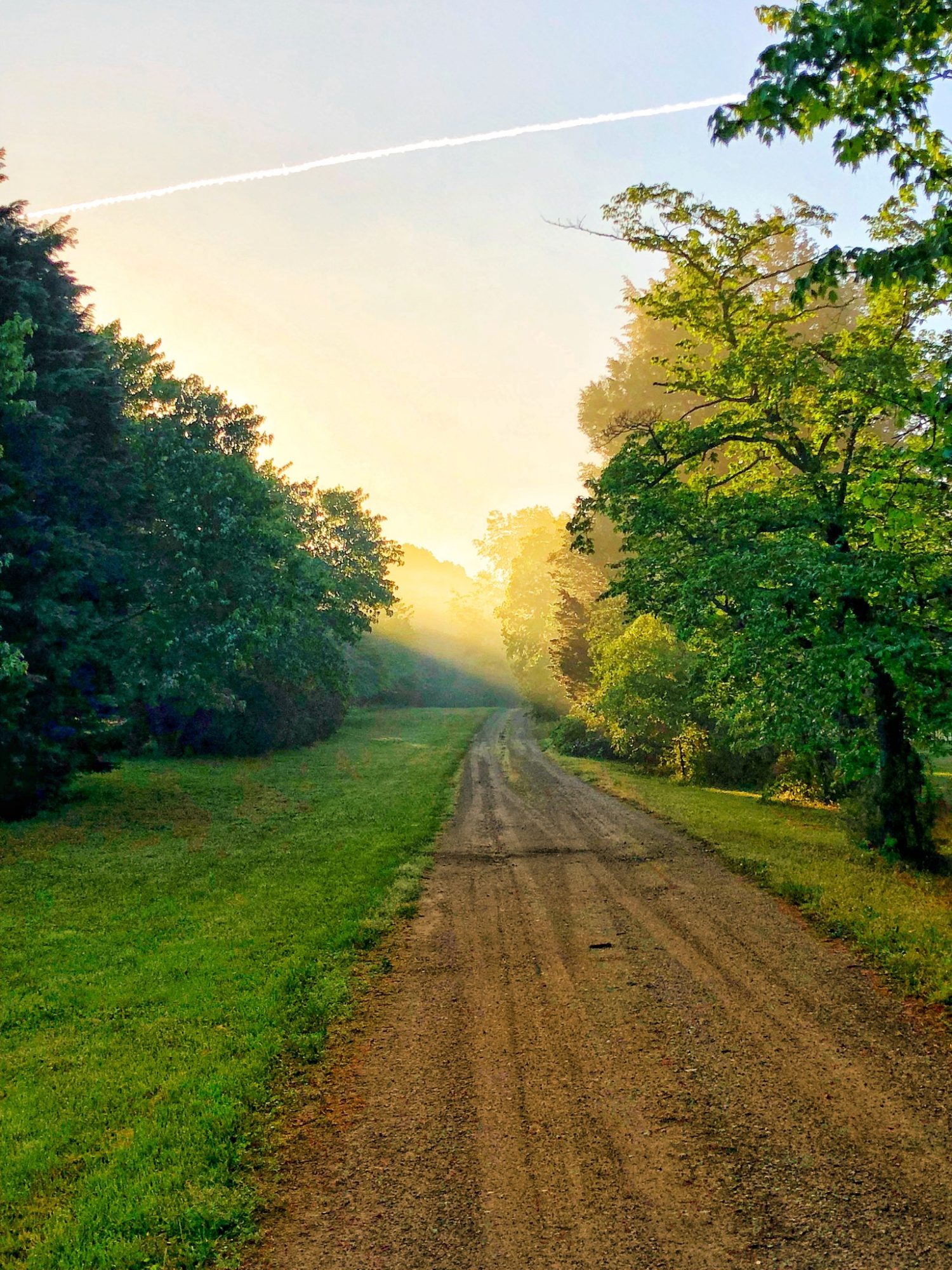
The view looking back up my driveway this morning as I was leaving for work.
iPhone X
F/1.8
4mm
ISO 20Attachments:
May 11, 2018 at 12:51 pm #30777 Ryan MadarisParticipant
Beautiful! The first thing I notice is the airplane contrail across the top of the frame. It’s quite distracting, so maybe you could edit it out or try to retake the photo again? The only other thing I notice is that the photo is quite over-edited. I would lower the contrast a bit and slightly mute some of the green. By the way, I love your driveway!
May 11, 2018 at 1:29 pm #30778Paul JohnsonParticipantRyan,
I tend to like my photos bold. Also, since I do not really know how to use photo editing software, I just use the canned presets until I find the one I like the best and use it.
I’m not sure I can edit the contrail out with the app I have on the phone.
May 11, 2018 at 1:33 pm #30779Ryan MadarisParticipant@paulnmerrie, ok, it’s still a great photo!
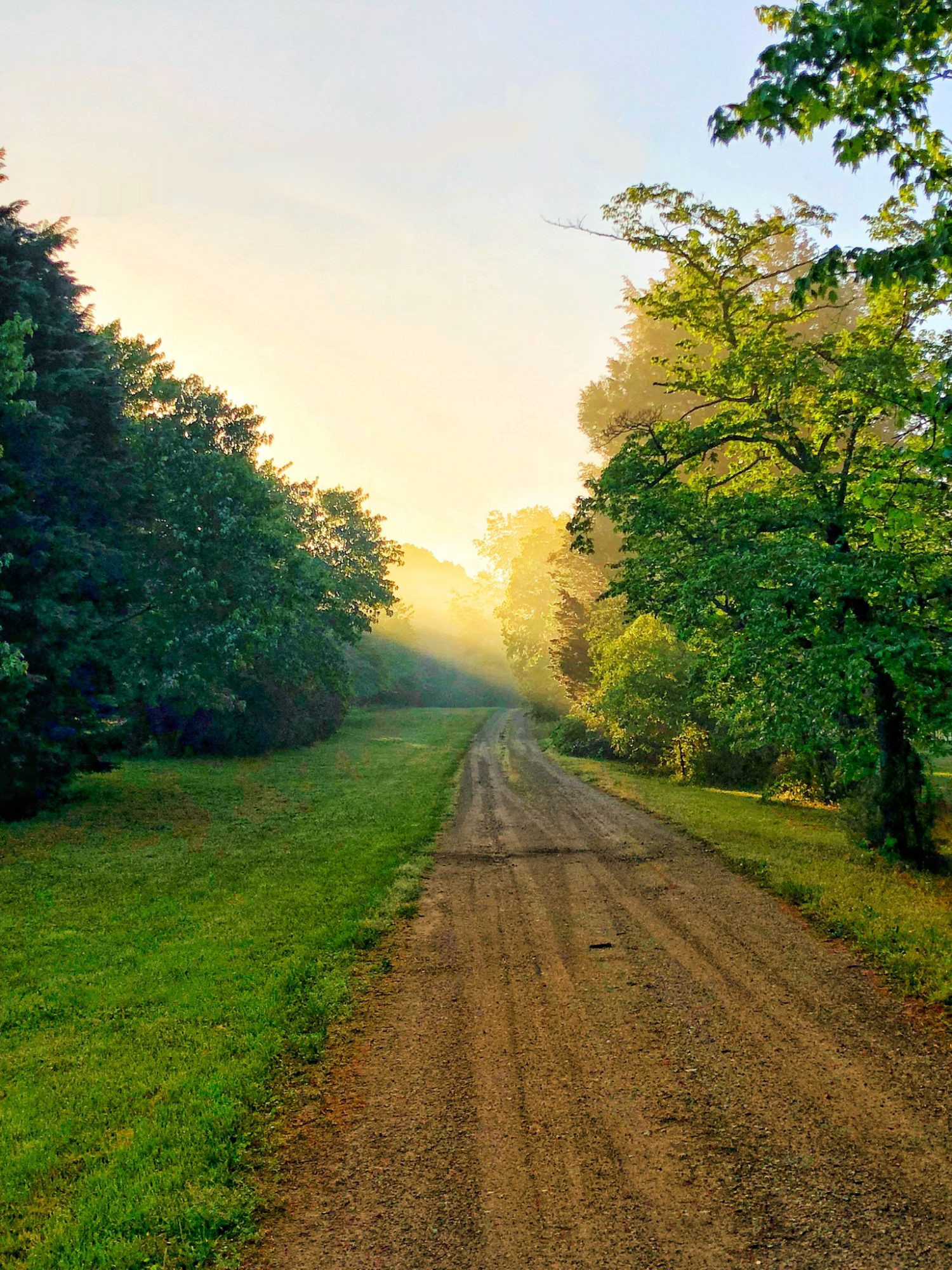
May 11, 2018 at 2:24 pm #30780Paul JohnsonParticipant@rmadaris Here it is again with the contrast lowered 10 and saturation lowered by 15 in Snapseed. Had to crop the contrail out. The healing tool was messing up the sky and the tops of the trees.
Attachments:
May 11, 2018 at 5:48 pm #30784Dan Cope
ParticipantThe cropped version is a big improvement and makes it into a much more purposeful composition! I like it! I’m with @rmadaris in finding the jet contrail in the first photo distracting. But even if it hadn’t been there the horizontal crop still works better because it eliminates all that empty space in the sky and focuses on what is interesting in the photo. I really like the way you framed it with that tree on the right!
May 11, 2018 at 6:04 pm #30785 Joseph CamusoParticipant
Wow, @paulnmerrie! I love your picture! Personally, I like the coloring and bold contrast.
However, my eyes were almost immediately drawn to the contrail. So, I put it into GIMP and did a rough edit to take out the trail.
Very nice shot, though!Attachments:
May 11, 2018 at 11:02 pm #30791Ryan MadarisParticipant@paulnmerrie, I like it a lot better that way! The horizontal crop does work better, like @dan-cope said.
May 12, 2018 at 12:48 am #30792 Benjamin HolmesModerator
@paulnmerrie I really love your photo! (especially without the airplane trail! 😉 )
You may find better results healing things on your phone out with Photoshop Fix. (free on the AppStore. You may or may not need a free Adobe account. Can’t remember!) If you’d like a more powerful healing and selection engine, Pixelmator is available on your iPhone for just $5.
I’m going to be the odd one out here and say your photo is better “uncropped”, or at least better in a portrait orientation than in a landscape one. I know, shocking anyone would say that! 🙂
There is a lot of open space in the original photo with the sky and road, but in my mind that doesn’t mean a bad composition. In fact, the open space in combination with the rich colors promotes a dreamy and yet clean feel that I love. I feel like some of that openness is lost when you crop out the open space.
I do have a bias, though. Leaving it in a portrait orientation keeps me from looking at tiny details and instead helps me to look at the whole photo, which in turn really opens up the photo’s design potential. The “openness” and clean feeling I mentioned earlier really frees me as a designer to place graphics on the photo without worrying about the photo getting too “busy.” It is because of this that I would highly recommend you submit your photo in the latest photo assignment! It definitely fits the brief in my mind and would certainly look great on the cover of a book.
May 25, 2018 at 1:36 pm #31012 James StaddonKeymaster
Enjoyed reading this discussion. My preference is to the horizontal one because it feels more purposeful in composition. I can see the vertical one really working, though, if perhaps the camera was swiveled right ever so slightly, and maybe tilted up to accentuate the aspects Ben mentioned.
-
AuthorPosts


You must be logged in to reply to this topic.