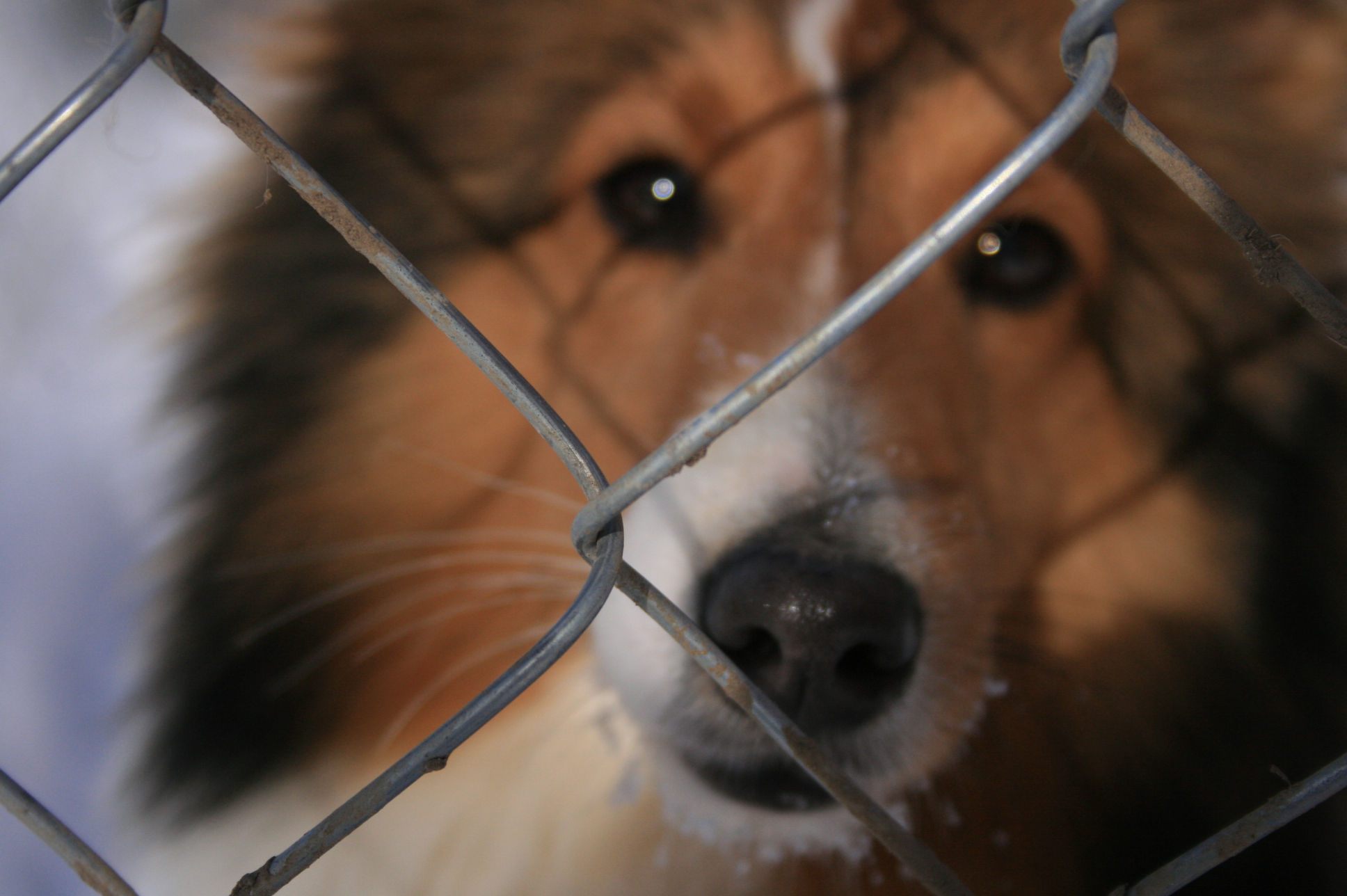
I hear you! It can be frustrating to get “that shot” and it wind up being out of focus. I would experiment with a few things. First and foremost, put your camera in a single point AF mode. If it’s on auto af point selection, the camera will always focus on the closest object it sees, and if one of the af points happens to be on the fence, that’s where it will go. That’s what it’s configured to do with the more basic cameras, and all cameras in the more basic modes. Instead, I would put it on single point, manual selection, and place your af point squarely in a hole in the mesh, as close to the eye of the dog as possible. Remember your AF points are actually usually larger than the guide boxes in your viewfinder would indicated. They are not always perfectly centred on the guide either, so give yourself some leeway. I would suggest using One Shot mode, to keep it from bouncing around and catching onto the fence if you accidentally move between shots.
I’d try landing focus on the dog and seeing how that fence turns out. The links will get bigger and blurrier. The greater the difference between camera to dog distance and camera to fence fence distance, the blurrier and bigger it will get. If you get close enough to the fence, you may be able to get it to disappear entirely, assuming the crop works for the dog.
What Focal length and aperture did you use here?
 .
.