
Home › Forums › Photography Q&A › Loud, Buzzing and Vibrating laptop
- This topic has 16 replies, 4 voices, and was last updated 7 months, 2 weeks ago by
Ezra Morley.

-
AuthorPosts
-
January 21, 2026 at 5:35 pm #99621
 Blessings CapturedParticipant
My laptop has been making some louder then normal sounds of buzzing and vibrating. It appears to be coming from the fan. Has anyone else had the problem of a noisy laptop fan? Was there anything you did that helped it?
I’ve tried several things that I saw recommended online. Below, I’ve tried to summarize how it’s happened and things I’ve done to try and help.
-About a year ago the fan noise become more noticeable. Following a video, I opened up the laptop and blew out the fan. There wasn’t much dust on the fan and it didn’t seem to help the noise. Since then I’ve just lived with the slight noise.
-1-7 I reinstalled the affinity apps. That filled my main hard drive(OS) to “red”. So I uninstalled a couple of apps I no longer needed and that brought it down to “33.1 GB free of 220”.
-1-10pm I failed to shut down the laptop like I normally do in the evenings. When I opened it up the next afternoon it immediately started making a buzzing and vibrating sound. After running for about 10 minutes the noise stopped.
-1-12 as I used it, it made the buzzing vibrating almost continually.
-1-12 through 1-17 Tried some trouble shooting: Raised the back of the laptop 1/2″ to give airspace to help it stay cool. Run “disk cleanup utility” on both hard drives. Run System File checker/ScanNow command. It said “Windows Resource Protection found corrupt files and successfully repaired them.” In the Task manager “end task” of a couple things that didn’t appear to be necessary. (The CPU is running at 20-30%). “Sleep” all background process that it would let me. A scan by my anti-virus software says there’s not viruses. During this week, the noise would sometimes stop completely. Sometimes is changes pitch slightly. But nether of these in a perceivable pattern. (When the sound does stop the laptop does not heat up but is cooler then when the fan is going). It only makes the noise when the laptop is open, it’s quiet when it’s closed.
-1-19 I seems to be better, when I open the laptop it makes noise for 3-5 seconds then is completely quiet.
-1-20 The constant buzzing and vibrating is back.I don’t know if or which things have helped. And I don’t know if somethings I did might have not been the right thing to do. The only things I know about computers is from DIY and trying to fix problems.
Laptop specifications: Dell Inspiron 3793, Windows 10, 256 GB SSD, 1TB HDD, 5 years old
Thank you for any advice!
-HannahJanuary 21, 2026 at 6:54 pm #99629 Peter MachenParticipant
It sounds like it might be because Windows 10 is no longer supported and I don’t think it has been since October. You might try upgrading to Windows 11.
Hopefully that helps!-Peter
January 22, 2026 at 8:59 am #99632Ezra Morley
ModeratorIt sounds like it might be because Windows 10 is no longer supported and I don’t think it has been since October. You might try upgrading to Windows 11.
Hopefully that helps!Upgrading to Windows 11 is (officially) recommended, but it’s not likely to solve your fan issue. Sounds like a hardware problem, not software.
My guess would be that the bearings on the fan have gone bad, or something is touching/rubbing the fan blades. Cleaning out the dust was a good first try. You may need to take it to a computer repair shop and ask for a diagnosis.
January 22, 2026 at 12:42 pm #99636Blessings CapturedParticipantPeter, I’ve wondered about Windows 11. I haven’t wanted to update to 11 because I don’t like the layout of things. But it would be nice if updating would help my laptop. Thanks for your suggestion!
You may need to take it to a computer repair shop and ask for a diagnosis.
🙁 But I guess a repair cost would be cheaper then a new computer. I’ll have to start researching for a good repair shop.
Thank you for your thoughts.January 22, 2026 at 1:14 pm #99637Peter MachenParticipantEzra, sorry, I must have accidently left out of my earlier comment that because Windows 10 is no longer supported it can’t do hardware updates. That can cause the laptop to do more work than normal, and that can cause the fan to spin more, which could cause the fan to start buzzing. That happened to our desktop computer until we upgraded but that probably isn’t the problem here. I agree, my first guess was something was in the fan too.
@BlessingsCaptured, some laptops you can take of the bottom panel off and might have access to the fan to clean it without taking the whole laptop apart. Here is a YouTube link that shows you how to do that https://www.youtube.com/watch?v=6fAalD8ysx8January 22, 2026 at 2:01 pm #99638ModeratorPeter, I’ve wondered about Windows 11. I haven’t wanted to update to 11 because I don’t like the layout of things. But it would be nice if updating would help my laptop. Thanks for your suggestion!
It would be a good idea to upgrade anyway, because it’s not very good to be running outdated versions of Windows that don’t get security updates. But I wouldn’t count on it fixing your noisy fan problem.
You can change the layout of Win 11 to look about the same as Win 10, so don’t let that stop you. 🙂
Peter’s suggestion about trying to get access to the fan is a good one. Here’s an official Dell article on the topic of odd computer noises.
January 22, 2026 at 4:39 pm #99640Blessings CapturedParticipantOkay, so I think my next plan is to try recleaning the fan. (The video you linked was the same one I followed a year ago. So I should be able to do it again. Thanks for looking it up!)
Then I’ll try and update to Win 11.January 22, 2026 at 7:09 pm #99643Peter MachenParticipantI’m so glad you were able to find a solution!🙂
January 23, 2026 at 7:14 pm #99662 James StaddonKeymaster
Before going to a repairman, would it hurt to just buy a replacement fan off of Ebay or someplace and just replace it yourself? I suppose it would depend on how difficult it is to remove/replace.
I was warry about upgrading to Windows 11 too. Finally did so in October after Windows 10 officially ended. Other than things looking a little different, and figuring out where a few things were re-placed, I’ve been very happy with it.
If you’re going to have to buy Windows 11, then you might consider buying a new computer altogether (in light of the fact that your current one is old, has potential hardware issues, and is in need of more space), but only you would know what things are major issues vs just minor issues that can be ignored or dealt with in a cheaper way.
Keep us posted!
January 26, 2026 at 11:01 am #99689Blessings CapturedParticipantWell I’ve made a start.
I opened the laptop and wiped/blow out the fan. There really wasn’t much dust. But it gave me confidence to see about replacing it myself. Do you know of a good place to buy a replacement fan? Do I find a reputable seller on eBay and get it there or does anyone know of other sources for computer parts.Also I ran the Dell SupportAssist, Hardware scan. The battery said “warning”; but everything else, including the fan, said “pass”. (That makes since with the battery because it drains quickly when not plugged in).
Then I’ve updated to Windows 11. It took several hours to do, but it didn’t cost.
Unfortunately the fan is still quite loud, so I going to try replacing it.
January 26, 2026 at 2:28 pm #99692ModeratorI wouldn’t be afraid of eBay if you’re careful to read the descriptions and choose to buy from a seller with good ratings (99.5% or higher). From a quick search it looks like NPFW6 is the part number. Keep in mind that anyone selling it new with a description that says “compatible with Dell…” is likely selling cheap aftermarket Chinese parts, if that matters to you.
January 26, 2026 at 3:41 pm #99694Peter MachenParticipantHere is a fan on eBay that looks pretty good. They have already sold 77 of these fans and they have a 99.6% rating.
January 26, 2026 at 7:50 pm #99700Blessings CapturedParticipantThank you for looking the part number and part up for me! And that’s good to know to look out for “compatible” parts.
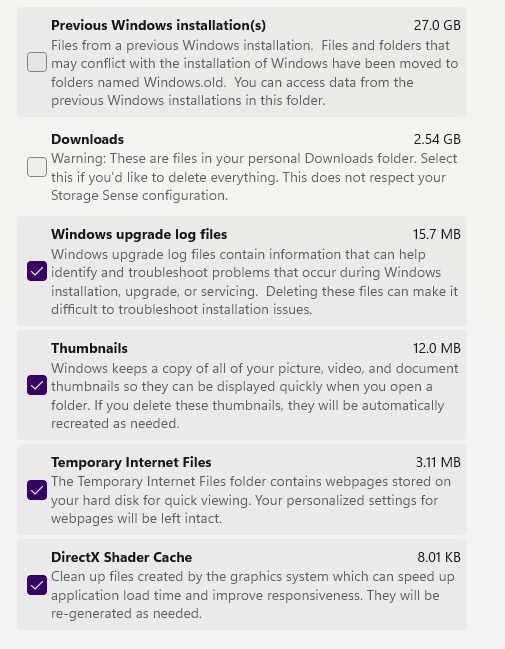
When I had the laptop open I got a number for the fan. It was interesting how on most of the parts there was a QR code the gave you the exact, big number for that part.I have a question about the windows update I did. Where you can delete temporary files there’s a place to delete “previous Windows Installation” and “Windows upgrade log files”. Are those safe for me to delete?
Attachments:
January 27, 2026 at 1:57 pm #99717ModeratorYoure welcome!
I wouldn’t be in a big hurry to delete the old Windows files unless you’re hurting for disk space. I’d suggest you give it a month or two and make sure Win 11 is stable for you and you’re able to use all your software packages properly before burning that bridge. 🙂
January 28, 2026 at 11:36 am #99757Blessings CapturedParticipantI’ve ordered a laptop fan and am looking forward to putting it in.
And I’ll keep those Windows files around for a bit.
-
AuthorPosts

You must be logged in to reply to this topic.