
Home › Forums › Photography Q&A › Shooting in Manual Mode
- This topic has 12 replies, 5 voices, and was last updated 3 months, 3 weeks ago by
 Joanna Coleman.
-
AuthorPosts
-
June 5, 2026 at 10:27 am #101401
 Joanna ColemanParticipant
Hello!
I wanted to get on here and ask a question about lighting and manual mode. I’ve been trying to shoot photos in the manual mode most of the time, but what frustrates me is how dark the pictures turn out. I’ve tried to turn up the ISO, as well as change different settings, but nothing seems to be helping. Thus, most of the time, I shoot in aperture priority (or AV on a Canon), since that gives me the brighter picture that I desire. But obviously, I can only change aperture, and not shutter speed.
I’m just beginning the course on how to shoot in manual mode, so maybe this topic would be covered there, but I just wanted to get on here as well and ask. Any help and advice would be greatly appreciated!
June 6, 2026 at 1:42 pm #101405Nate Bergen
ParticipantHi! Without seeing the camera, it’s not quite as easy to know what you need to change, but what aperture and shutter speed do you use?
June 7, 2026 at 4:49 pm #101412Joanna ColemanParticipant@nateb So, depending on the shot, most of the time I will use between a F5.6 (which is as low as my lens goes) to about a F11 aperture, and at least a 1/500 shutter speed, sometimes more. Hopefully that is enough info.
June 7, 2026 at 5:29 pm #101413 Loewen FamilyParticipant
Do you use a really long lens that doesn’t have VR or something? Because otherwise, 1/500 is a very high shutter speed esp in low light situations!
If your lens is not equipped with VR you have to use at least that high a shutter speed. For example, if I use my 300 mm I have to choose a shutter speed number the same or higher than 1/300. Usually I start with the lowest shutter speed I can and occasionally for really bright sunshine or a fast moving subject I will bump it up. I def have learned and improved juggling settings for a well exposed photo, I had some issues with that myself when I was starting. (And I still occasionally forget to stop and check my photos- then later realize they are not usable😅) You will get better with practice for sure!
Would some links to articles be helpful or are you just looking for personal advice?😃
-LeanneJune 7, 2026 at 5:37 pm #101414ParticipantAlright, I’m not sure then why your pics would be dark, cuz f/5.6 with a 1/500 shutter speed should often give you a good pic (assuming you do mostly outdoor shooting). Looking through some of the outdoor pics I took with my T6 (I use an EOS R now, but I was just looking at my T6 pics, since that would be more like the camera you use) and plenty of my pics were taken with a shutter speed of 1/500 or faster and I wouldn’t say they’re too dark (on cloudy days my shutter speed was lower, like 1/160 or even lower sometimes). But how about trying a slightly lower shutter speed? Another question (and this might be your solution), what do you have the light metering set to? I think if you set that to Evaluative, then set the shutter speed according to what the light meter shows, your pics will look more like you want them to
June 7, 2026 at 5:54 pm #101415ParticipantSorry, @loewfam, I didn’t see your comment before I posted mine. I guess it depends where you live. Here we have a lot of really sunny days, so 1/500 at f5.6 is often not an issue, but that might not be the case where @kansasgirl lives
June 7, 2026 at 6:39 pm #101416Joanna ColemanParticipantThank you both for your responses!
@loewfam I’m not sure what VR is, so I don’t know if my equipment has it. I use an EOS Rebel T7 with a 18-55 mm lens and a 75-300 mm lens. Typically, when I try to use a lower shutter speed than 1/500, I end up with a blurry picture. I would love some articles if you have any links! I also just need to go out and do some more experimenting and practicing with my camera to get a more solid diagnosis.
@nateb Thanks so much! I will try that out and see how it works. I did just go out and try shooting with a lower shutter speed, and it produced a much better picture than before. I usually have my metering set to Evaluative. I do typically shoot in almost full sun or full sun, but the times when I shoot in the shade is typically when I get frustrated with dark pictures. Thank you so much for your help! I’m still pretty new to the photography world, so I’m still trying to figure all this out 🙂June 7, 2026 at 7:21 pm #101417ParticipantYou’re welcome, ma’am! Glad I could help!
(Btw, VR is called IS {or Image Stabilisation} in Canon’s terminology. {Almost every brand has their own term for it.} I just looked up the lenses you use. If I’m not mistaken, your 18-55mm has it, but you 75-300 doesn’t {please correct me if I’m wrong}. Which is rather unfortunate, cuz it’s a lot more necessary on your big lens. Since your 75-300mm doesn’t seem to have IS, I think your best bet is either to up your ISO a little so you can use a shutter speed that’s high enough to prevent camera shake or to use a tripod.)
-
This reply was modified 3 months, 3 weeks ago by
Nate Bergen.
June 7, 2026 at 7:24 pm #101419Joanna ColemanParticipant@nateb Ah, ok! Thanks for clearing that up, that’s why I didn’t recognize it. Ok, I will definitely do that! I might also look into a tripod, as well.
June 7, 2026 at 7:34 pm #101420 Logan LamarParticipant
Hi @kansasgirl!
VR is Nikon lingo. On some Canon lenses, there’s a switch that’s called “Image Stabilization” and we abbreviate it as IS. There’s a chance your 18-55 has it. There’ll be a second switch right next to the auto/manual focus switch right on the side of the lens. (not all lenses have this though so if you don’t have it don’t sweat it). It helps with shooting handheld at slower shutter speeds.
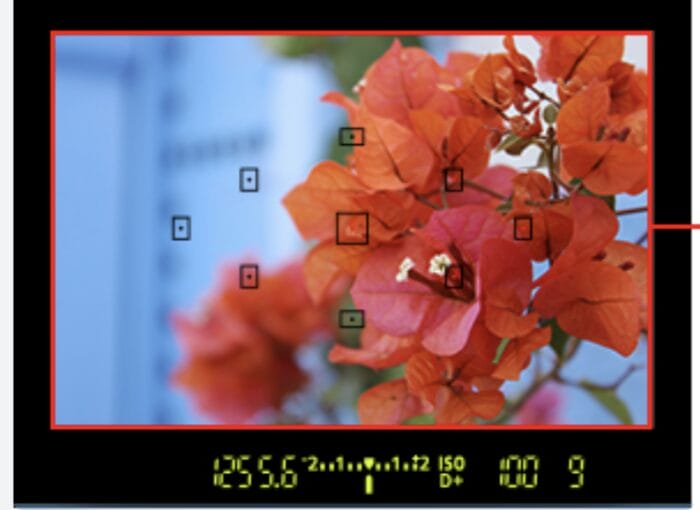
As far as your original question… keeping an eye on your lightmeter is gonna be your main weapon for making sure everything is set correctly. It’s the scale with all the numbers on it underneath what you see when you look through the viewfinder (eyepiece) (see the attached pic).
You want that arrow to generally be pointing right at the 0 with the combinations of settings you have set (it’ll be close). Leaving your camera on evaluative metering while you’re learning is going to be fine.
This is usually the order I set my settings when I’m playing with Manual.
1) ISO — ideally this is as low as possible. I like 100 or 160 (outdoors full sun); 400-800 (outdoors shade); 1600+ (indoors)
2) aperture — depends on what I’m shooting. If I want all of the image to be in focus, higher numbers like f8 or f11; if I want a blurry background, f3.5 (or as low as your lens will allow).
3) shutter speed — the general rule is 1/whatever your focal length (zoom) is. I usually go a couple clicks faster to be safe. So if you’re shooting on your 18-55mm all the way zoomed in, don’t go slower than 1/60.If the meter is still reading too low with your shutter speed and aperture, go back to your ISO and raise it.
Take the shot. If it doesn’t look right, tweak the settings and try again! You’ve got the right idea by trying new things and figuring it out.
You’ve got this! Welcome to the hobby 🙂
–Logan
Attachments:
June 7, 2026 at 7:36 pm #101422Logan LamarParticipantOne more thing! James has a great product here for explaining Manual Mode well. I don’t get a kickback for this or anything but it did help me a ton when I was getting into Manual for the first time 🙂
Good luck!June 11, 2026 at 7:06 am #101453 James StaddonKeymaster
Hi @kansasgirl! As @nateb said, there are a lot of factors making it hard to diagnose long-distance, but my first advice would be exactly what @loganlamar said. When shooting in full Manual, keep an eye on the light meter (it can also be called the “exposure compensation indicator”) and use the three settings (aperture, shutter speed, and ISO) to put the arrow on 0 (I like to call that “center the needle”). The resulting photo should be in the ballpark of a nicely exposed photo, and you can make it brighter or darker from there depending on what you think looks good.
If that doesn’t help, let us know!
June 12, 2026 at 9:49 am #101504Joanna ColemanParticipant@loganlamar @jamesstaddon Thank you both so much, all these tips have really been helping me! My pictures look so much better now, and the ebook is really helpful, too. 🙂
-
This reply was modified 3 months, 3 weeks ago by
-
AuthorPosts


You must be logged in to reply to this topic.