Forum Replies Created
-
AuthorPosts
-
May 4, 2015 at 11:19 pm #10757
snmiller
Participant@buddingphotographer, thanks for suggesting WLPG. It worked well enough for my purposes to get the colors reasonably fixed, but if I make another white balance mistake like this one again, it would be much nicer to batch process the photos! Thanks for the link to Lightroom at B&H. I’ll consider it.
May 4, 2015 at 7:51 pm #10753Participant@buddingphotographer, Yes, I have Windows Photo Gallery, and also Microsoft Office Picture Manager (part of Office 2010, I think). I’ll try both of these. If I have trouble, I’ll check back with you.
@thefarmhand, I believe I had my camera set on cool white fluorescent. Thanks for your generous offer, but I’ll probably have 40 or so to fix. I’ll try Photo Gallery first. Do you know if Lightroom is available for one-time purchase, vs. monthly on-going subscription? Regarding Photoshop Express, I do have windows 8 tablet, so perhaps I’ll try the app as well.Thanks!
March 2, 2015 at 8:50 pm #9804ParticipantThanks, @buddingphotographer, for sharing your photos of freezing rain. And also the snowflake photos – you’ve been busy!
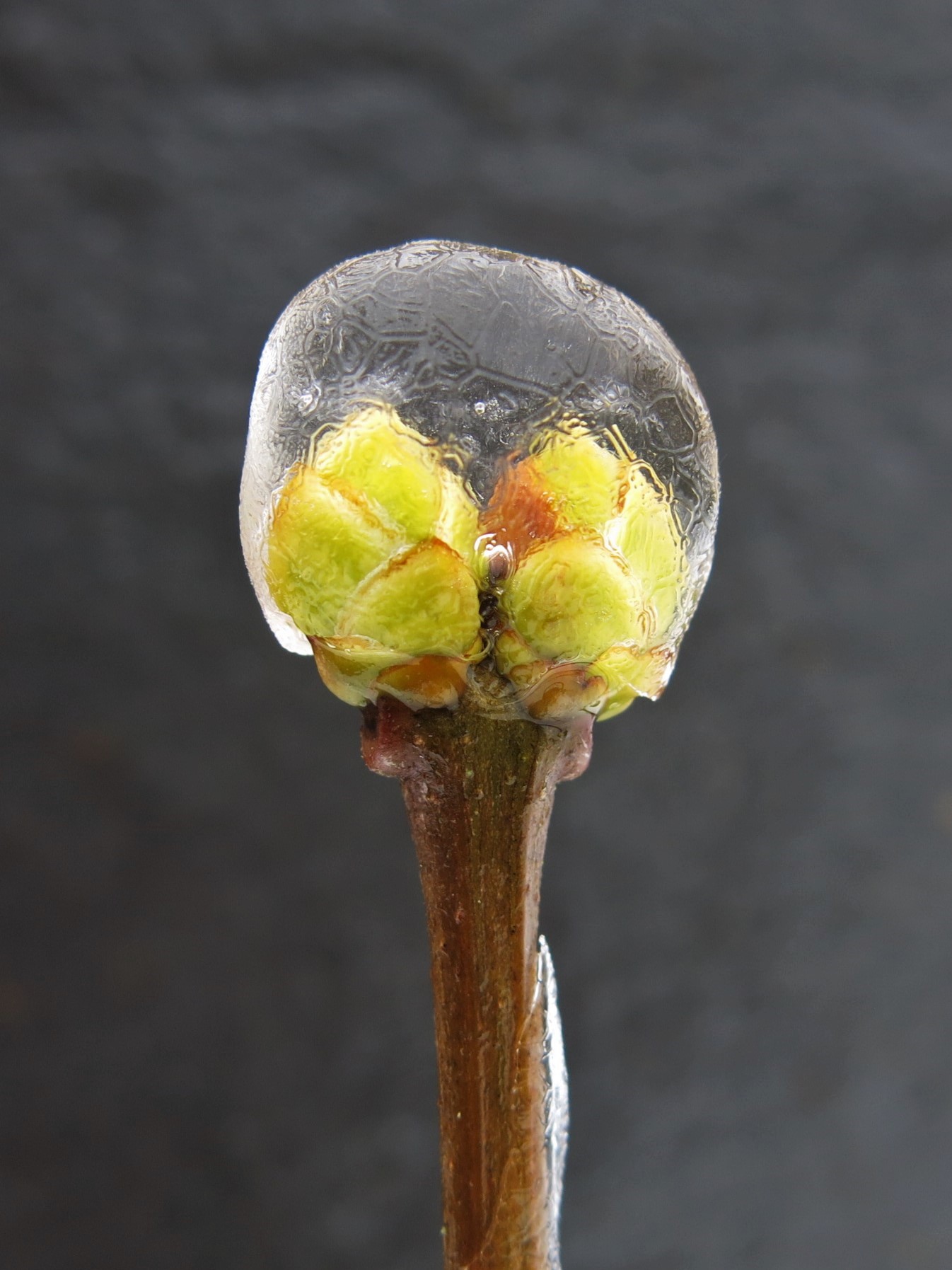
To James’ question about background for my shots, I just held a piece of slate tile far enough back to be out of focus, but provided much needed contrast.
February 1, 2015 at 3:33 pm #9599ParticipantI agree with James about taking the shot slightly more to the left, closer to the fence, to improve the composition. I think I would also have tried to move the twig that’s next to the fence post out of view. Still it’s an appealing photo, if only because I enjoy the snow in (what appears to be) a country setting.
Another idea – I think this has potential as a b&w, with slight adjustment to lighting to make it even more crisp. And if the fence post was really old and gnarled, with lots of visual interest and character, you could consider cropping it to a portrait orientation. This makes it less of a landscape shot, and the fence post really becomes the only subject. I took the liberty of trying this with your photo. The resolution is not looking too good – getting pixelated, but you can get the idea. What do you think?
Attachments:
January 31, 2015 at 10:34 pm #9596ParticipantI just came across your snowflake photos – amazingly beautiful! God is the ultimate artist, and the medium is “just” water!
They reminded me of another beautiful winter phenomenon. Have you ever taken a close look at the ice formed by freezing rain? We get it here in western Oregon every year or 2, and I’ve noticed some amazing patterns in the ice. Here are a couple shots from last winter. Photo conditions weren’t great, much like what James recently described about winter in WV – dull gray overcast, cold, wet, and the ice was starting to melt. I didn’t have opportunity to try to set up the shots for nice composition, just wanted to capture what I was seeing before it disappeared. Photos taken with a Canon PowerShot G15. I nudged the contrast and highlights a bit to help bring out the detail.
If you get freezing rain in your part of the world, I’d enjoy seeing what you can capture.
Attachments:
November 28, 2014 at 2:45 pm #8555ParticipantThanks @buddingphotographer for the tutorial, and glad my photo was useful. I stepped through the process and only had a couple challenges: 1. Arranging the dockable dialogs… I could get them to be side-by-side next to the main window, or on an additional tab, but couldn’t figure out how to stack them as in your screenshots, and 2. I had to hunt a bit to find out where to set the size of the paintbrush. Otherwise, it was easy to follow your instructions. Thanks!
November 17, 2014 at 11:26 pm #8333Participant@buddingphotographer, thanks for the link to the tutorials you wrote. I took a quick look at them, and I think they will give me a good start with GIMP. Adjusting sharpness and lighting and using layers seem like some of the primary things I would be likely to want to do. I also appreciate your concern about inappropriate content – it’s hard to avoid on the internet, even with filtering. Thanks!
November 16, 2014 at 11:42 pm #8296Participant@buddingphotographer, I like the enhancement you made to the photo. It makes the scene appear as I could imagine it being on a sunnier day.
This is veering off-topic for this particular forum, but I have 2 questions: 1. Can enhancements like this be done with GIMP? 2. Can you or others on the forum recommend a good intro/how-to guide for GIMP?
Thanks for the feedback!November 12, 2014 at 11:51 pm #8267ParticipantOops, looks like photos attached above didn’t upload in the same order as the text… but you can tell which is which!
November 11, 2014 at 8:34 pm #8252ParticipantThe editing program I used was Microsoft’s Photos app, running on an ASUS T100 tablet. And yes, I was at first hoping for a neutral background, but in the end, the greenish cast didn’t seem completely out of place.
I recently downloaded Gimp on a desktop PC, and assume that it could create the neutral background. Haven’t had time yet to learn much about the program.November 10, 2014 at 10:57 pm #8237ParticipantNice shot, timtam. I really like the color and the contrast against the black background. I’ve explored a bit with the effects of different backgrounds, and to my eye, at least, I think they can have a very positive effect on the impression the photo gives.
This year we’ve had beautiful fall color here in Western Oregon, and I’ve tried to capture a bit of it in a few recent shots. Here’s one where I’ve taken “artistic license” and explored the effects of boosting color saturation, contrast, etc. The real leaf had much more subtle color but the yellows and hint of green along with the graceful shape caught my eye. It’s definitely not meant to be an accurate representation of the real thing (See James’ blog for a good discussion of exaggeration). The background is a piece of gray slate, lighting is indirect outdoor lighting on a cloudy day, with a nearby tree canopy adding a hint of green.Attachments:
-
AuthorPosts